NetSuite Data Migration Fundamentals: Lessons From the Field

May 29, 2026

Data migration is one of the highest-risk workstreams in any NetSuite implementation—and one of the most commonly rushed. At Novelance, we treat it as a primary workstream from the first weeks of a project, running in parallel with discovery instead of being saved for the end. Left unmanaged, migration can also become extremely time-consuming and costly—particularly when the underlying data isn’t accurate or complete. The consequences tend to show up where they hurt most: a go-live date that slips, end users who don’t trust the new system because their records look wrong, and a first month-end close that won’t reconcile. With so many details involved in importing data into NetSuite, what should teams focus on—and what pitfalls should they avoid? Here are a few fundamentals we rely on.
Clear ownership should be established early in the process. Accountability can drift to whoever is coordinating the migration, but true data ownership needs to sit with the business—either the customer (in a consulting engagement) or the internal account owner.
For that reason, the Data Owner should be involved in all aspects of the migration and should understand which NetSuite records are being imported and why.
During sample import testing, the Data Owner should be involved and sign off on the test results each cycle—confirming that the outcomes align with expectations and raising concerns early enough to address them before the next test. Teams that leave ownership loosely defined often do not discover issues such as duplicates, missing values, or inconsistent legacy standards until user acceptance testing—or worse, after go-live, when fixing records can require chasing down source documents that are no longer easy to find. On more than one engagement, a single sign-off cycle has surfaced a faulty data assumption that would otherwise have propagated silently into thousands of records—caught in an afternoon rather than during a post-go-live scramble.
Scheduling recurring touchpoint meetings as part of data migration testing—at least weekly—helps ensure consistent progress and gives the team an opportunity to workshop the latest test results. Expectations for these sessions should be set so the Data Owner brings updates on testing outcomes and any issues to discuss with the rest of the team, keeping the conversation focused. This is also meant to help ensure the Data Owner feels comfortable with the data being tested.
The level of technical aptitude varies by individual, and some Data Owners may find it challenging to make decisions for some of the data choices that will come up along the way (e.g., which legacy identifier to use as a cross-reference). When this comes up, what often contributes to the technical challenge for the Data Owner is a lack of familiarity with NetSuite. This is where working with consultants who have solid NetSuite expertise will make a world of difference, as they will play a key role in simplifying the decisions for the Data Owner into specific options/choices and providing pros/cons for each approach. This should lead to constructive discussions with the Data Owner that help guide them through the choices, formalize their decisions, and leave all sides aligned and confident in the approach they choose.
While many Data Owners know their data has some issues, what’s almost always underestimated is how much effort it will take to extract that data from the legacy system in the first place, and how much cleansing is going to be needed—and how long both steps will take. Companies need to take a deep, unbiased look at their current data versus how they want it to look in NetSuite to understand the size of the gap to bridge. For some companies, this can take weeks; for others, it may take several months of focused effort from a data SME to resolve issues and clear the way for the eventual data migration. Because of this, it is best to start data cleansing as early as possible—which is typically once the plan for a specific record type’s data migration has been finalized (i.e., confidence has been established for which record the data will be brought in as/under and which data fields will be populated for it such that downstream processes are going to be supported). This objective will require resources that are thorough, patient, and have a solid understanding of the business’s processes and corresponding data needs. Assignment of competent resources will make a significant impact on the quality of the end results and the process to achieve them.
A common (and often premature) question is: “How long will it take to get all of my historical data into NetSuite?”
Skipping this step often means learning both the load time and the error rate for the first time during the production cutover—when there is little room left to react. On past projects, a timed trial has influenced the plan for the better well before cutover weekend—showing, for instance, that a dataset needed to be staged in batches rather than pushed in a single overnight run.
The decisions below come up on almost every migration, and each one shapes how clean, usable, and trustworthy the data will be once it lands in NetSuite.
Pick a cross-reference that is unique and matches how users actually search for records.
Selecting the right cross-reference field—such as External ID or Item Name/Number—can be challenging, especially early on when many candidates appear viable. A couple of guidelines help reduce rework:
When deciding whether a legacy data element should be brought into NetSuite, begin with the end in mind. Not all legacy details are appropriate for tracking within an ERP. If a data element is necessary to support future reporting, lookups, or transactional processes in NetSuite (or in systems that depend on NetSuite data), it is relevant enough to track. If it is primarily aesthetic or qualitative, is unlikely to be relied upon, and will remain accessible in the legacy system, it can often be excluded.
This is also where projects can quietly go sideways: we have repeatedly seen a “unique enough” identifier turn out to hide duplicates in the legacy data, discovered only when NetSuite rejected the import. It is why we pressure-test candidate fields against the full dataset before committing to one.
Start with one to two years of history; bring in older data later, and only when it is reliable.
CRM and transaction historical records are important to all companies. When it comes to deciding on how much history should be brought into NetSuite, it is tempting to try to bring in as much history as possible, but this approach rarely makes sense for the following reasons:
When volume, transformation needs, or timelines strain CSV import, weigh an external loader or API.
Native NetSuite CSV importing is typically appropriate when you are bringing in two years or less of critical data and the timeline allows enough time for each phase of the process. However, there are often situations where it may become more advantageous to consider utilizing a non-native method for getting the data into NetSuite. The following are key considerations when deciding whether to use a non-native option, such as an external data loader or an integration/API approach (for example, Boomi, Celigo, or Jitterbit):
When one or more of these factors points toward a non-native approach, there are options at different levels of cost and effort. On the lighter end, some teams use a free, purpose-built data loader—such as Celigo’s free data loader tool—to move data in without standing up a full integration platform. On the more custom end, we’ve seen clients build in-house RESTlets (leveraging NetSuite’s SuiteScript/REST capabilities) to load data considerably faster than native CSV import, which can be worthwhile when volumes are high or timelines are tight.
Map records, lists, and fields deliberately—one-to-one is the exception, not the rule.
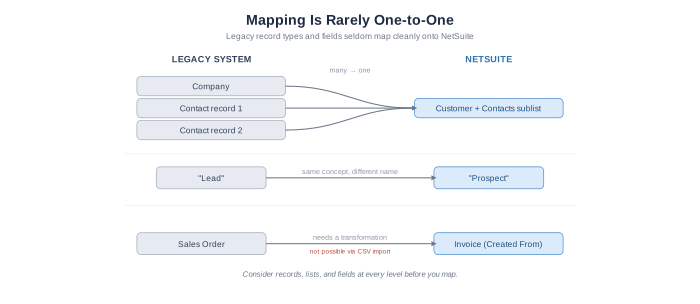
How data is handled can vary significantly between systems. For example:
This makes comparison and thorough analysis of the details expected to be brought into NetSuite essential. Considering all levels of data (e.g., Records, Lists, Fields) is recommended. Misjudging which record types and fields map between systems can force a rework of the migration plan later, or surface as an unexpected user experience when stepping through downstream processes. Ensuring that all key stakeholders related to an impacted process are involved—and holding workshopping sessions to agree on why it makes sense to map specific legacy record types/fields to designated NetSuite record types/fields—will help streamline this decision process. Once the initial mapping is agreed upon, and a sample import has been processed, an end-to-end walkthrough, in NetSuite, is recommended to help ensure alignment on planned data architecture and terminology.
CSV import cannot create linked transactions; plan for Workflow, SuiteScript, or an external tool.
The degree to which certain transaction linkages are expected to exist can impact whether some automated, transformation processes may need to be created. It’s important to remember that the NetSuite CSV tool is built to create standalone records, so it doesn’t go through NetSuite’s “transformation engine”. Consider the common use case of trying to link an Invoice to a Sales Order and have the linkage reflected through NetSuite’s native “Created From” field. This cannot be accomplished through the NetSuite CSV import tool. You would either use NetSuite’s Workflow or SuiteScript capabilities to trigger a transformation—so invoices are created with the native linkage populated—or leverage an external tool that includes access to the NetSuite transform operation as part of its feature set.
Store attachments in cheaper external storage and import only the URLs into NetSuite.
For historical file attachments, the priority is usually ensuring the files remain readily accessible after the migration. However, that does not necessarily mean the files need to live in NetSuite. When possible, store files in an external cloud storage platform that can provide URLs. During the historical data import, include those URLs so the files are referenced on the appropriate records without consuming NetSuite storage space. Because NetSuite storage can be considerably more expensive than dedicated file storage solutions, this approach can help reduce expected storage costs. Storing too much data in NetSuite can also affect system performance, which is another reason to keep only files that truly need to reside in the ERP.
Numeric identifiers longer than 15 digits can silently corrupt in Excel—import them as text.
If a CSV is opened in Excel, numeric values longer than 15 digits can be silently rounded due to Excel’s precision limit (the trailing digits may be converted to zeros). This most commonly appears in serial numbers, tracking numbers, long account numbers, and barcode-like values—fields that look numeric but function as identifiers rather than quantities.
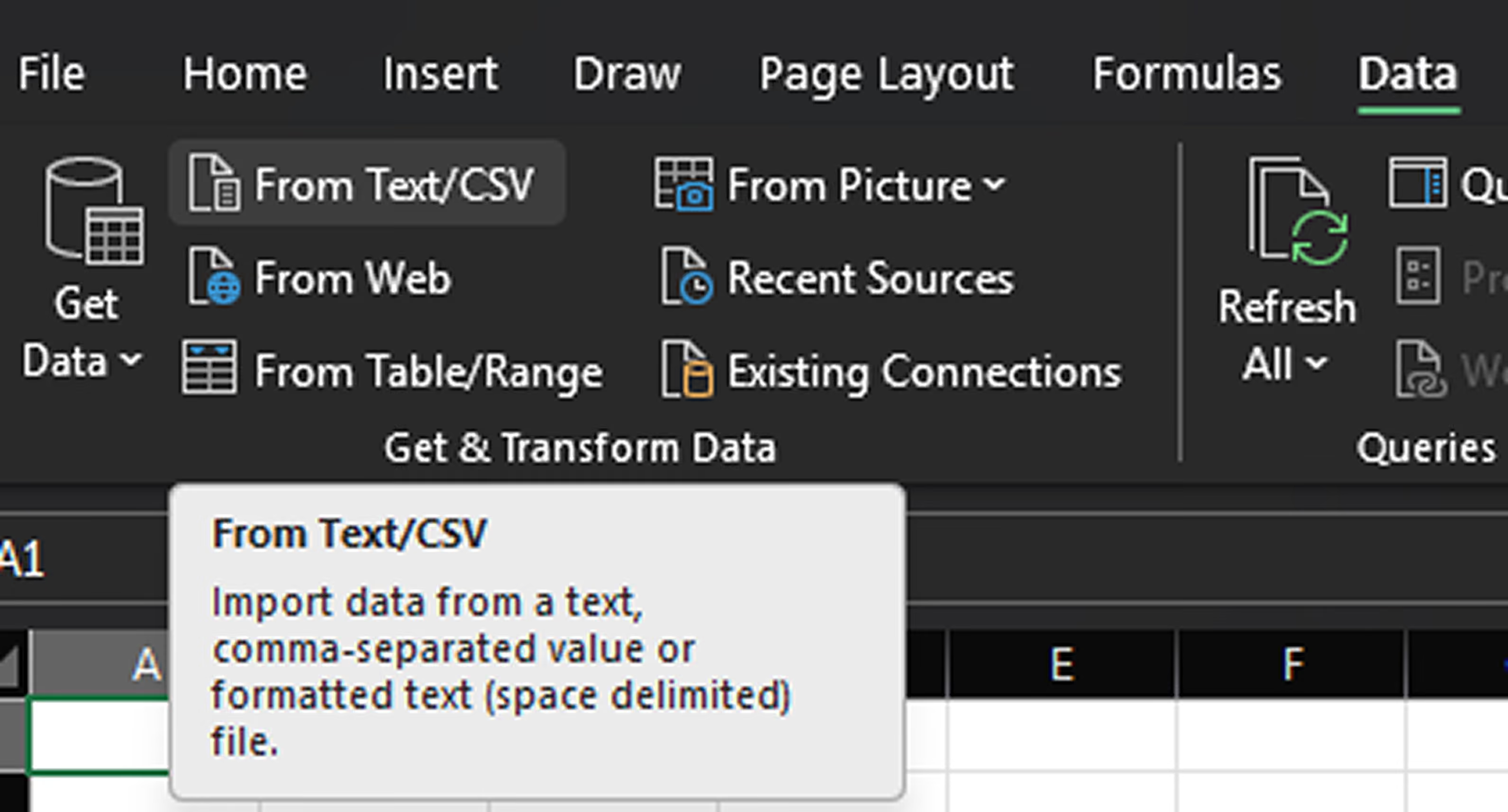
A practical workaround is to use Excel’s Get Data From Text/CSV import flow and set data type detection to avoid automatic conversion before loading the data into a sheet. This preserves the full value. If the issue goes unnoticed, truncation is often only discovered during reconciliation, when distinct records appear to collide under the same corrupted identifier.
To initiate this process, you would create a new Excel file and click the ‘From Text/CSV’ option, under the ‘Data’ navigation tab in Excel:
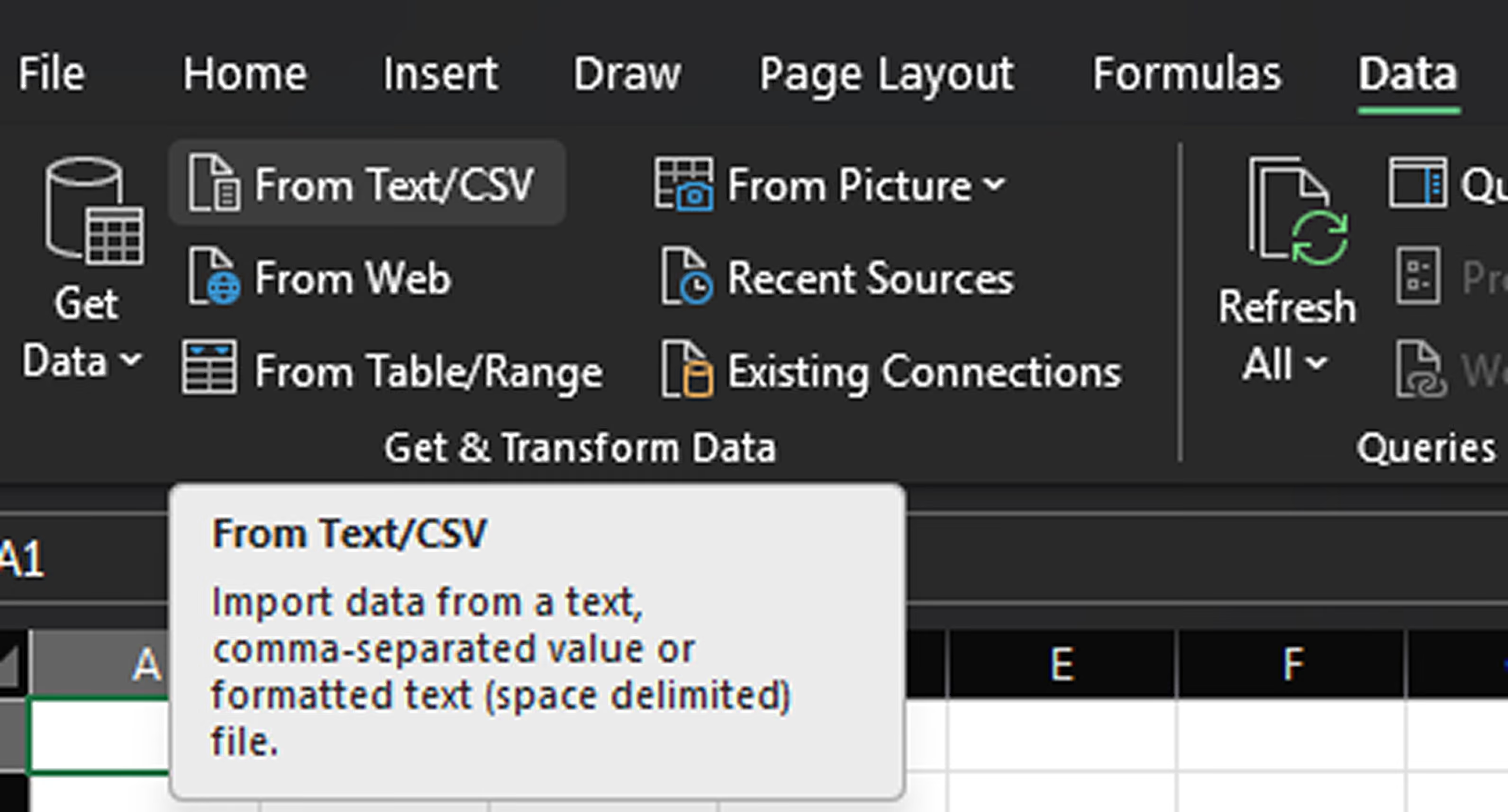
After selecting your file, the next screen will provide a preview and it’s important that you update the ‘Data Type Detection’ to “Do not detect data types” as this is what will allow the raw data values to come through, rather than any type of data conversions inadvertently happening.

The last step would be to click the ‘Load’ button, at which point your data will be pulled into a new spreadsheet with all values being retained.
One more thing to consider: whenever possible, avoid using legacy identifiers that are numeric strings with leading zeros as primary cross-references, since they are easy to corrupt during spreadsheet handling. They are not always avoidable (for example, when a value functions as a barcode), but they should be treated carefully and validated early. Choosing a field that turns out not to be unique can force renumbering mid-project—expensive rework once records, transactions, and integrations already reference it.
These fundamentals cover tactical details that are often overlooked mid-migration, but they are only one part of a larger discipline. A complete data migration also includes defining historical cutover scope, mapping fields to NetSuite’s schema, running staged trial load cycles in a sandbox, executing a controlled production cutover, and performing a post-migration audit. Getting the fundamentals right early is what makes the later stages run smoothly instead of surfacing as last-minute surprises at go-live. This is exactly why we treat migration as a primary workstream from week one, in parallel with discovery, rather than a task saved for the end—starting early is what turns a nerve-wracking cutover into a predictable one.
If your organization is planning a NetSuite migration, Novelance’s Data Migration practice can help you build a plan around these fundamentals from day one—so your data lands clean, your team trusts it, and go-live arrives without the last-minute surprises. Reach out to our team to talk through your project.